During the week, there's always something happening on campus: staff meetings, classes, outside events. But the TV in our campus operations office stays on the same layout, and sometimes it's looking at empty rooms, playgrounds or parking lots. I figured it would be more useful if the layout changed based on what's actually happening around campus.
We already book every room in eSPACE, and those bookings already show up on the monitor in the IT office (I wrote about that in eSPACE Calendar as Digital Signage). So I wrote espace-wave-sync. Every 15 minutes it reads today's events, swaps the right cameras into a shared "Daily View" layout, and drops a bookmark on each of those cameras for the length of the event. When nothing is happening, the layout falls back to a set of default cameras.
How it works
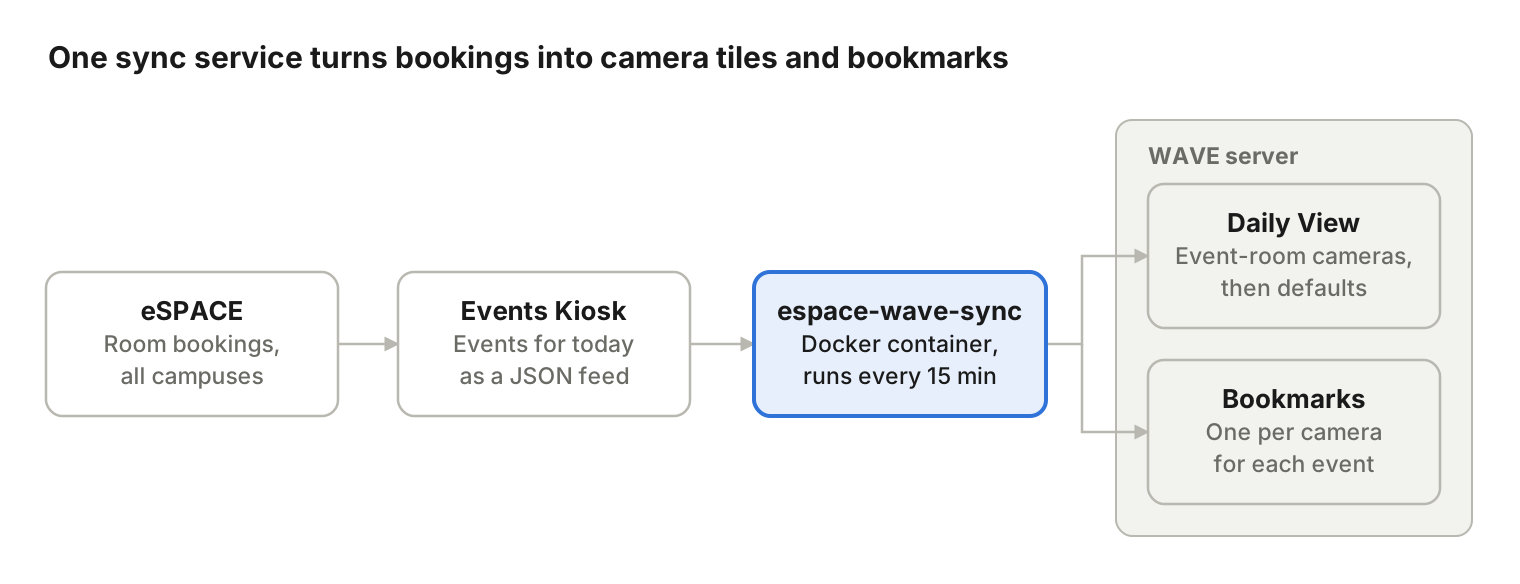
The sync never talks to eSPACE directly. It reads a JSON feed from eSPACE Events Kiosk, the signage app I'd already built, so the eSPACE API token lives in one place.
Each run does four things:
- Pulls today's events and the rooms they're in.
- Maps each room to its cameras from a config file. Rooms without cameras map to an empty list.
- Fills the layout: cameras for events happening now come first, taking turns when several events compete for tiles, then all-day events, then the default cameras, up to a tile cap. I use 16 for a 4x4 grid.
- Bookmarks each current event on each of its cameras, once.
It records what it has already added and bookmarked in a small state.json file on disk. A restart or crash doesn't create duplicate tiles or bookmarks, which I confirmed by restarting the container in the middle of an event.
Three things that tripped me up
None of these are in the WAVE docs in a way I could find, so here they are.
1. The certificate is issued to the server ID, not the IP
WAVE's self-signed certificate names the server's ID (a long GUID), not its IP address or hostname. Connect by IP and TLS verification fails, which is where most guides tell you to turn verification off.
Don't. Export the server's certificate, trust it as a CA, and tell your HTTP client to expect the server ID as the TLS server name while still connecting to the IP. In espace-wave-sync that's two settings: WAVE_CA_CERT and WAVE_TLS_SERVERNAME. Verification stays fully on. If you run merged servers, each one has its own ID and certificate, so add each one to the CA file.
2. Only admins can create layouts
Creating a layout through the REST API is admin-only. Rather than give the service admin rights, I had an admin create one empty shared layout by hand. The sync finds it by name and only ever adds or removes items inside it. It never creates, renames or deletes layouts.
3. A 404 error that's really a permissions problem
When the service account couldn't see a camera, bookmark requests came back 404 "Device not found", not 403. WAVE hides devices you can't access instead of refusing you. If you're chasing a 404 on a camera you know exists, check the account's camera rights before you check the camera ID.
What permissions it actually needs (WAVE 6.0.5)
On WAVE 6.0.5, editing a shared layout's items through the REST API takes a Power User. I tried two lower roles first, each with rights granted on that one layout and a fresh login session.
| Role tried | Login and read layout | Add or remove tiles | Bookmarks |
|---|---|---|---|
| Viewer + all rights on the layout | Works | 403 "not permitted to modify" | 404, cameras not visible |
| Advanced Viewer + rights on the layout and cameras | Works | 403 "not permitted to modify" | Not tested yet |
| Power User | Works | Works | Works |
The fresh session matters. The service keeps its login session between runs, so after changing a role, restart it before you test, or you're testing the old permissions.
If you run it as a Power User, harden the account
Power User is broad, so treat these as required, not optional:
- A dedicated local account, not a cloud account and not anyone's personal login.
- A long, unique password, stored only in your password manager and the service's environment file. Rotate it if it's ever exposed, even in a screenshot.
- Lock down the environment file (
chmod 600) and keep it out of the repo. The repo has secret scanning and a pre-commit check for exactly this reason. - Run the service on an internal host only. It never needs to be reachable from the internet.
What's next
Two questions are still open, and I'll update this post when I have answers:
- Is there a narrower role that works? I couldn't find a right that lets a non-Power User modify one shared layout's items through REST v3. A custom role with edit rights on just that layout and its cameras is the obvious thing to try.
- Does WAVE 6.1.2 change any of this? We're upgrading soon, and I'll re-test the endpoints and the permissions afterward.
After that, I'd like to try motion and person detection through WAVE's event rules, so a busy room can surface even when nothing is on the calendar.
The code is on GitHub at spiff888/espace-wave-sync. If you try it, or know the answer to the permissions question, open an issue there.